Highlight Text On Scroll
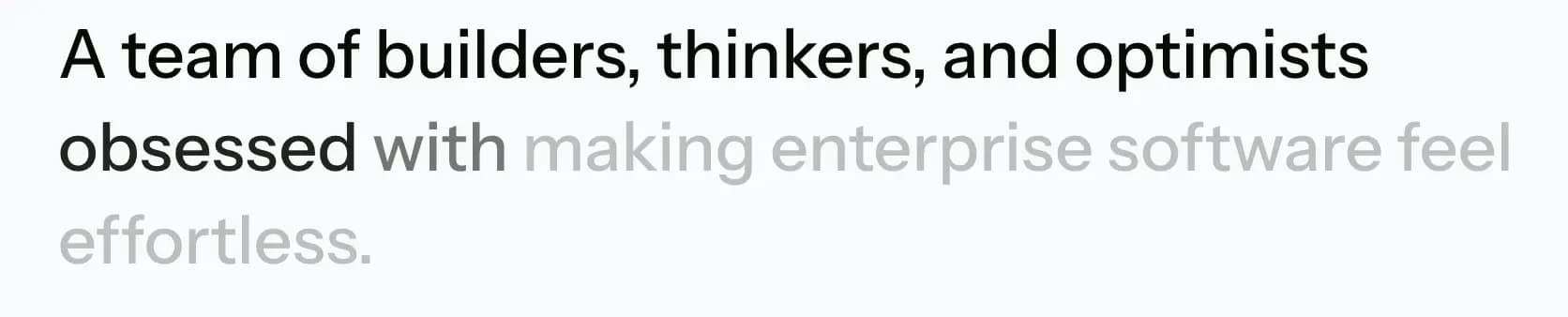
The highlight-text-on-scroll plugin creates a beautiful typography animation that reveals text word-by-word as it scrolls into view. It uses GSAP’s ScrollTrigger and SplitText to split the target element’s text into lines and words, animating their opacity as the user scrolls down the page.
In development, it is implemented in assets/js/modules/highlight-text-on-scroll.js and is initialized automatically by assets/js/main.js.
Markup Requirements
To use the plugin, simply add the data-highlight-text-on-scroll attribute to the text element (such as a paragraph <p> or heading <h2>) you wish to animate.
The plugin automatically splits the text into words and sets their initial opacity to 0.25. As the element scrolls into view (from when its top hits the bottom of the viewport to when its bottom hits the center), the words smoothly fade to full opacity with a stagger effect.
All start and end values are automatically wrapped with GSAP’s clamp() function to prevent the ScrollTrigger from starting or ending beyond the scroll range.
Customizing animation values
You can override the default animation behavior per-instance by adding any of the following optional data attributes:
| Attribute | Default | Description |
|---|---|---|
data-highlight-text-on-scroll-opacity | 0.25 | The initial opacity of each word before it animates in. |
data-highlight-text-on-scroll-stagger | 0.2 | The delay (in seconds) between each word’s animation. |
data-highlight-text-on-scroll-duration | 0.5 | The duration (in seconds) of each word’s fade-in. |
data-highlight-text-on-scroll-start | top 100% | The ScrollTrigger start position. |
data-highlight-text-on-scroll-end | bottom 50% | The ScrollTrigger end position. |
Markup Example
Below is an example markup showing how to apply the attribute to a text block.
  <!-- Start: Default animation (all defaults apply) -->
  <p class="text-2xl leading-snug font-medium md:text-4xl" data-highlight-text-on-scroll>
    A team of builders, thinkers, and optimists obsessed with
    making enterprise software feel effortless.
  </p>
  <!-- End: Default animation -->

  <!-- Start: Custom animation (slower stagger, earlier scroll start) -->
  <p class="text-2xl leading-snug font-medium md:text-4xl"
    data-highlight-text-on-scroll
    data-highlight-text-on-scroll-stagger="0.4"
    data-highlight-text-on-scroll-start="top 80%">
    A team of builders, thinkers, and optimists obsessed with
    making enterprise software feel effortless.
  </p>
  <!-- End: Custom animation -->
Demo Example
View the complete code sample on this page.
 About Page