Price Switch
The price-switch plugin is a simple utility that allows users to toggle between different pricing intervals (e.g., Monthly vs Yearly). When toggled, it updates all associated price elements across the page by reading their corresponding data attributes.
In development, it is implemented in assets/js/modules/price-switch.js and initialized automatically by assets/js/main.js.
Markup Requirements
To implement the price switcher, use the following data attributes:
data-price-switcher: The container for the switcher buttons.data-price-switcher-trigger: The buttons used to toggle pricing. It accepts values like"monthly"or"yearly". The active trigger will automatically receive thedata-activeattribute.data-price-monthly: Applied to elements displaying the price, defining the monthly price value.data-price-annual: Applied to elements displaying the price, defining the annual price value.
Markup Example
Below is a simplified structural example of how to implement the price switcher, based on the implementation in the pricing page:
<!-- Switcher Toggle -->
<div class="flex justify-center">
  <div data-price-switcher class="inline-flex items-center gap-1 rounded-full border p-1">
    <button
      class="rounded-full px-5 py-2.5 data-active:bg-primary data-active:text-white"
      data-price-switcher-trigger="monthly"
      data-active
    >
      Monthly
    </button>
    <button
      class="rounded-full px-5 py-2.5 data-active:bg-primary data-active:text-white"
      data-price-switcher-trigger="yearly"
    >
      Yearly
    </button>
  </div>
</div>

<!-- Pricing Elements -->
<div class="grid grid-cols-2 gap-4 mt-8">
  <div class="rounded-2xl border p-6">
    <h3>Starter</h3>
    <div
      class="text-3xl font-light"
      data-price-monthly="$49"
      data-price-annual="$39"
    >
      $49
    </div>
  </div>

  <div class="rounded-2xl border p-6">
    <h3>Professional</h3>
    <div
      class="text-3xl font-light"
      data-price-monthly="$149"
      data-price-annual="$119"
    >
      $149
    </div>
  </div>
</div>
Demo Example
View the complete code sample on this page.
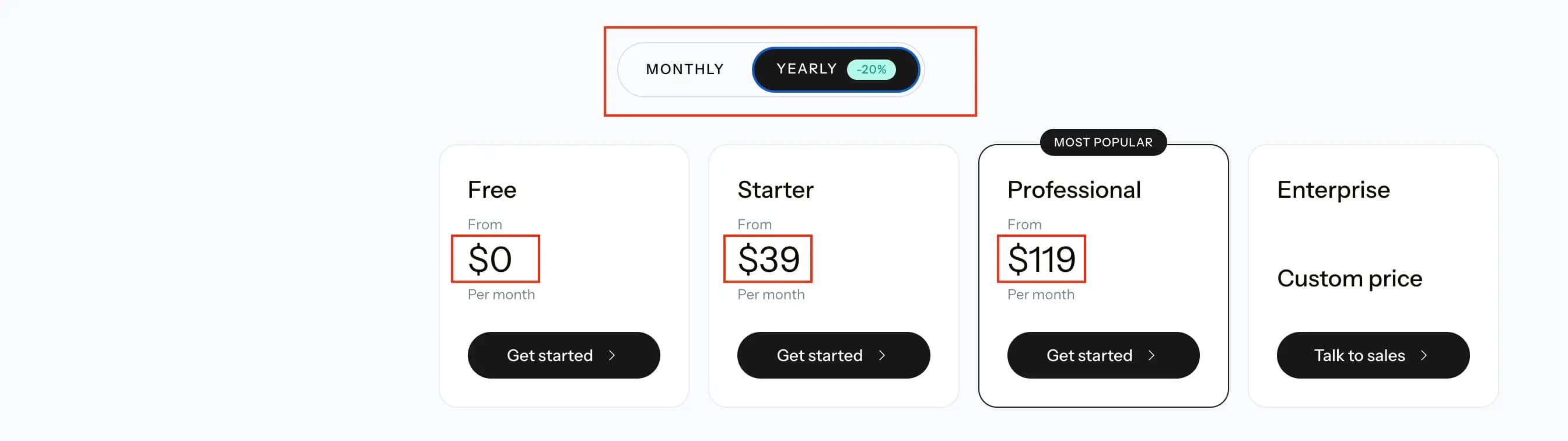 Pricing Page
Last updated on